
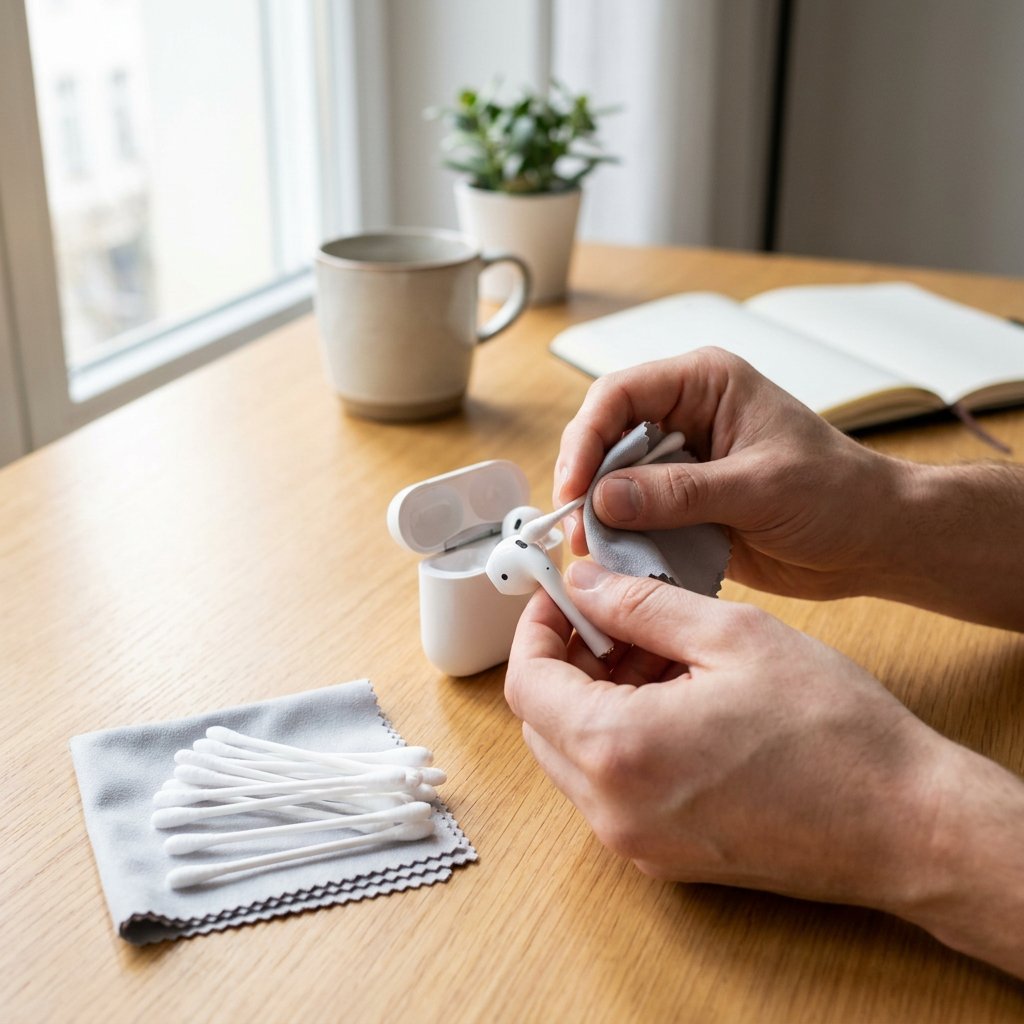
Clean AirPods sound better, charge more reliably and feel more hygienic. Even so, earwax, dust, skin oil and lint build up surprisingly quickly in the speaker mesh, around the sensors and inside the charging case. You notice the result straight away: lower volume, a muffled microphone or a case that no longer charges as well.
The good news is that cleaning AirPods is easy, as long as you work dry, carefully and precisely. Do not use running water, metal objects or harsh cleaners. With the right method, you can safely clean your Apple AirPods, AirPods Pro and AirPod case without damaging the mesh, charging contacts or finish. This kind of careful approach is also important for related tasks such as telefoonhoesje schoonmaken.
Why dirt affects sound and charging so quickly
With AirPods, the most important parts of the technology are right on the outside. A thin layer of earwax on the speaker mesh can already noticeably muffle the sound. Dust in the microphone openings makes calls less clear. And in the case, lint and residue around the contact points can stop one or both earbuds from charging properly. So regular cleaning is not only a matter of freshness, but also of performance and lifespan.
What you need for safe cleaning
You do not need complicated tools. A simple AirPods cleaning kit consists of a dry microfibre cloth, dry cotton buds and a soft toothbrush or small soft brush. For stubborn marks on the outside, you can very lightly dampen a cloth with 70% isopropyl alcohol. For removable silicone ear tips on AirPods Pro, lukewarm water is enough. Avoid paper clips, needles, hard toothpicks, all-purpose cleaners and compressed air. They increase the risk of damage more than the chance of results. Not sure which type you use? Read more about bedrade of draadloze oordopjes and what that means for maintenance.
Cleaning AirPods step by step
Step 1: preparation
Take the AirPods out of the case and place them on a clean, soft surface. If they are damp from rain, exercise or condensation, let them dry completely first. Work with clean hands and make sure you have good lighting so you can clearly see dirt in the mesh and around the edges. If you often work out, check our tips voor sporten met oordopjes.
Step 2: clean the speaker mesh and openings
Always start dry. Do not scrub the speaker mesh hard. Instead, gently loosen the dirt with a soft, dry brush. Work with small movements and let the dirt come out rather than pushing it further in. Then use a dry cotton bud around the edge of the mesh and at the openings for the microphone and sensors. Cleaning the inside of AirPods in practice means cleaning only the visible openings, never opening the housing or poking anything inside.
For stubborn earwax
If residue is still visible, repeat the dry cleaning two or three times rather than using more force. Pressing too hard is exactly the most common mistake. It pushes earwax through the mesh, resulting in worse sound.
Step 3: clean the outside and sensors
Wipe the outside of each earbud with a dry microfibre cloth. If there are traces of lotion, sun cream, make-up or hair products on them, use a cloth that is only minimally dampened with 70% isopropyl alcohol. Never apply liquid directly to the AirPods and dry them immediately afterwards with a clean part of the cloth.
Step 4: let them dry and check
Let the AirPods sit for a few minutes before putting them back in the case. Then check the sound and see whether the sensors and controls respond normally again.
How to clean an AirPod case without causing damage
Cleaning an AirPod case requires extra precision, because this is exactly where the charging contacts and port are vulnerable. First wipe the outside of the case or cover with a dry microfibre cloth. Then open the case and clean the recesses where the AirPods sit with a dry cotton bud. Gently rotate it along the sides, but do not press on the metal contact points. For the hinge and the edges, a soft dry brush works best. If you see dark residue around the edge of the lid, you can very lightly dampen a cloth with isopropyl alcohol and carefully wipe along the dirt. Do not let moisture get into the charging port and never insert a metal object into the connector. Only charge the case once it is completely dry. If you charge wirelessly, see the verschil tussen Qi2 en MagSafe.
Differences by model: AirPods, AirPods Pro and AirPods Max
Cleaning AirPods Pro ear tips
With AirPods Pro, you can remove the silicone ear tips. Rinse them separately with lukewarm water, without harsh soap or cleaner. Dry them completely with a lint-free cloth and only click them back on when they are truly dry. This is especially useful if you are cleaning AirPods Pro because of visible earwax on the tips.
AirPods and AirPods 2/3
With standard AirPods and AirPods 2 or 3, follow the same dry method, but without removable tips. Be extra careful with the speaker mesh here, because it is directly exposed.
AirPods Max
AirPods Max require a different approach because the ear cushions and headband contain fabric. Use a slightly damp, soft cloth for this and let the parts dry completely before using them again. Alcohol on fabric or mesh is not a good idea here.
Alcohol, water and other mistakes you should avoid
You can clean AirPods with alcohol, but only sparingly and only on the outside or with a slightly damp cloth. Preferably use 70% isopropyl alcohol. Never rinse regular AirPods or the case under the tap. Compressed air is also not recommended, because it can blow dirt and moisture deeper into openings. Also avoid abrasive cloths, strong cleaning products and sharp tools. The safest rule is simple: several gentle cleaning sessions are better than one aggressive one.
What if 1 AirPod sounds quieter?
If one AirPod is quieter, there is often dirt on that specific speaker mesh. First clean only that side again with a dry brush and a dry cotton bud. Then check whether both AirPods are properly charged and whether the audio balance on your iPhone has not accidentally been set to the left or right. If that does not help, unpair the AirPods and pair them again. If the difference remains audible, there may be stubborn dirt or a technical issue.
Frequently asked questions about cleaning AirPods
How do you get earwax out of your AirPods?
Use a soft, dry brush and gently work the earwax away from the mesh. Wipe away any remaining residue with a dry cotton bud. Do not use a needle and do not press on the mesh.
How do I clean my Apple AirPods?
First clean the speaker mesh dry, then wipe the outside with a microfibre cloth and finally clean the case separately. Always keep liquid away from openings and charging contacts.
Can you clean AirPods with alcohol?
Yes, but only carefully. Use 70% isopropyl alcohol on a cloth for the outside and never directly in the mesh, the case or the charging port.
Can an AirPod case get wet?
No. The case is not designed to be rinsed off. Always clean it dry or with a minimally damp cloth on the outside.
How often should you clean your AirPods?
If you use them daily, a quick clean once a week is sensible. If you use your AirPods for sports, on the go or in a dusty environment, check even more often for earwax, lint and residue in the case.
If you want to limit dirt build-up for longer, always store your AirPods clean and use a good protective case. Suitable audio accessoires can also help keep your earbuds not only tidier, but performing at their best for longer.